Hold Your Sculpture: The Case for Putting a Cheap 3D Printer on Your Desk
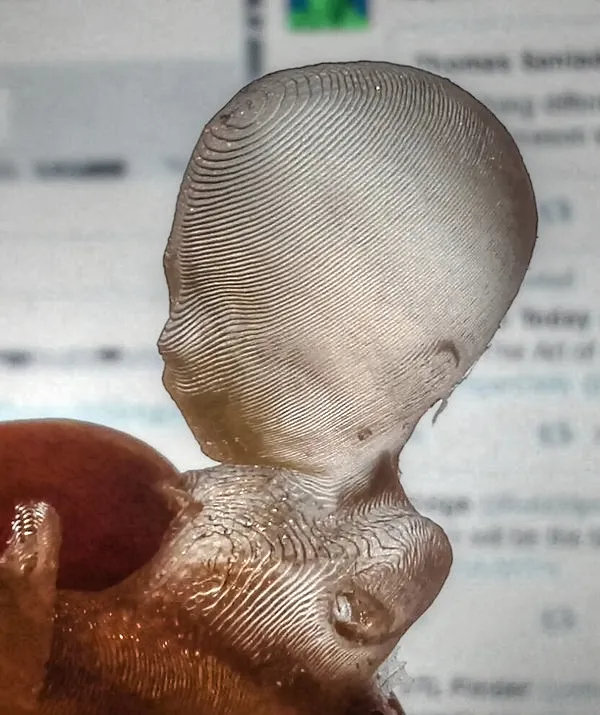
Photo: Nevit Dilmen (talk), CC BY-SA 3.0, via Wikimedia Commons
I'm going to make an argument that will annoy some people: if you're serious about digital sculpting and you don't own a 3D printer, you're developing skills with one hand tied behind your back.
Not because you need to produce physical products. Not because printing is the end goal. Because the screen — even a great one, even calibrated, even in glorious turntable mode — hides things from you that a $4.99 hunk of cured resin will show you in four seconds flat.
What the Screen Steals From You
Digital sculpting has a dirty secret: the viewport is a lie of convenience. You view your sculpt from angles you choose, lit the way you choose, scaled however you like. Your brain quietly fills in gaps and forgives flaws.
Print something and the forgiveness stops. Volume problems you never noticed — a skull that's too shallow, a torso with no actual mass, a sword that would snap under its own weight — become physical facts. You can't argue with a lopsided shoulder when you can rotate it in your actual hands.
The biggest one is silhouette. Sculptors who've printed their work describe the same revelation: shapes that looked dynamic on screen turn out flat and mushy as physical objects. Reading a silhouette as a solid black shape — the old traditional-sculpture exercise — becomes trivial when the object is literally sitting on your desk.
Resin or Filament: The Sculptor's Answer
The eternal question, answered for our niche specifically.
Filament (FDM) printers are cheaper to run and safer to own, but layer lines are thick and fine facial detail turns into mush. For a sculptor, FDM is decent for large forms, props, and rough maquettes. It's a blunt instrument.
Resin (MSLA) printers are the sculptor's tool, full stop. Sub-$300 resin printers today produce surface detail that genuinely rivals a production cast. Skin pores, fabric folds, tiny creases — they come through. The tradeoffs: resin handling requires gloves and ventilation (a garage, basement, or well-ventilated room does it — this is a real safety consideration, not a suggestion to skip), and prints require washing and curing.
For catching sculpt-level errors, resin wins and it isn't close. If safety constraints rule it out, a budget FDM still teaches the silhouette and proportion lessons — you just won't get the fine-detail feedback.
What's Actually Under $300 Right Now
The entry market has gotten absurdly good. Budget MSLA resin printers from the major hobby brands routinely land between $180 and $280, often bundled with wash-and-cure solutions on sale. On the filament side, the reliable beginner workhorses — the ones every US hobbyist forum recommends — hover right around the $250–300 line.
Add maybe $50–100 for consumables: resin, gloves, IPA or a wash alternative, and a respirator. That's a real investment, but compare it to literally any other piece of gear in your setup. It's less than a decent monitor arm.
How Printing Rewires Your Digital Eye
Here's the part nobody expects: the feedback loop changes your unprinted work too.
After a few months of printing regularly, sculptors report catching errors at the digital stage — instinctively. You start sculpting in physical mass instead of screen pixels. You check silhouettes without being told to. You develop an intuition for weight and balance that no amount of viewport turntabling teaches.
It's the same reason traditional sculptors and life-drawing advocates keep showing up in these pages: constraints and physical reality make better digital artists, not worse ones. The screen is a tool, but it's also a cushion. Printing pokes holes in it.
The Honest Downside
Fairness demands I mention the frustration tax. Your first prints will fail. Supports will scar your favorite sculpt. You'll cure a fingerprint into a cheek at 11 p.m. and question your life choices. There's a learning curve, and it's real.
But here's the difference between printing and every other side-quest: the failures teach sculpting. Every support scar is a lesson in form planning. Every warped print is a lesson in thickness and mass. Even the failures make you better at the thing you actually care about.
Print it or lose it. The errors your screen is hiding right now aren't going away — but for the price of a nice dinner out, you can finally see them.